# Template Configuration

<figure><img src="/files/YylennDZC7Hy9EO2wIOx" alt=""><figcaption></figcaption></figure>

1. **Open the template**: Navigate to the template you want to configure.
2. **Upload rich media**: Add any required images, PDFs, or videos.
   * **Image size limit**: 5MB
   * **Video size limit**: 14MB
   * **PDF size limit**: 100MB
3. **Configure body tags**: Set up any necessary tags within the template body.

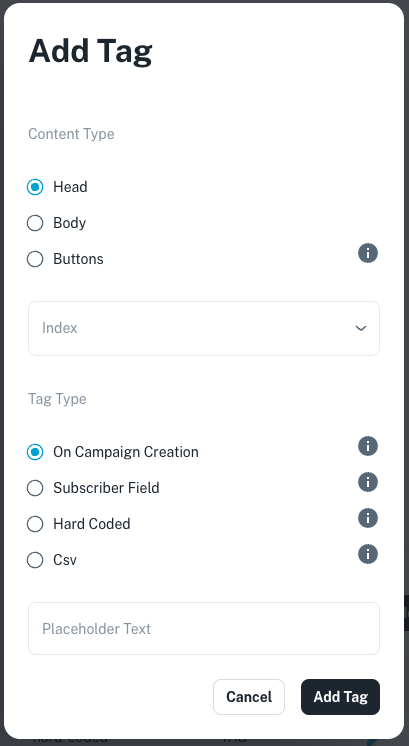
A **tag** is a placeholder in your template that gets replaced with dynamic content when your broadcast is sent. Tags can be used in different parts of the message to personalize or customize it for each recipient.

* **Select Tag Location**: Choose where the tag will appear in the message: Header, Body, or Button.
* **Tag Index**: The index number (e.g., {{1}}, {{2}}) refers to the tag’s position in your preview.

<figure><img src="/files/9yT4sT3PjreE3jWO0XAh" alt=""><figcaption></figcaption></figure>

<table><thead><tr><th width="254">Tag Types</th><th>Description</th></tr></thead><tbody><tr><td>On Campaign Creation</td><td>The campaign creator will be prompted to provide this value when setting up the campaign. The same value will be used for all messages.</td></tr><tr><td>Subscriber Field</td><td>The value will come from each subscriber's information, meaning it will be unique for every recipient.</td></tr><tr><td>Hard Coded</td><td>The value is set in the template and cannot be changed during campaign creation.</td></tr><tr><td>CSV File</td><td>The value will be imported from a CSV file, allowing it to be different for each subscriber.</td></tr></tbody></table>


---

# Agent Instructions: Querying This Documentation

If you need additional information that is not directly available in this page, you can query the documentation dynamically by asking a question.

Perform an HTTP GET request on the current page URL with the `ask` query parameter:

```
GET https://docs.channel360.co.za/channel360-guide/templates/template-configuration.md?ask=<question>
```

The question should be specific, self-contained, and written in natural language.
The response will contain a direct answer to the question and relevant excerpts and sources from the documentation.

Use this mechanism when the answer is not explicitly present in the current page, you need clarification or additional context, or you want to retrieve related documentation sections.
